Showing posts with label tutorial. Show all posts
Showing posts with label tutorial. Show all posts
Saturday, February 9, 2019

Sunday, August 17, 2014
How to add 4 way reboot on Galaxy Fame

In this article i'm going to show you how to add 4 way reboot on samsung galaxy fame, what is 4 way reboot anyway?
Tuesday, July 8, 2014
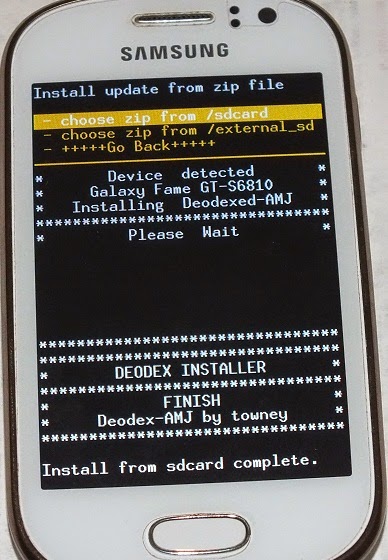
How to Deodex Samsung Galaxy Fame
Friday, July 4, 2014
How to add navigation bar on Galaxy Fame

Hello guy's, welcome back, today i'm going to show you how to add on screen navigation bar on samsung galaxy fame.
[Custom ROM] CorsiFame for Galaxy Fame

There is another custom rom for samsung galaxy fame called CorsiFame made by people at xda developer forum.
CorsiFame is a really nice custom rom, i really like the UI, makes my galaxy fame looks better, this rom also fast and smooth.
Thursday, July 3, 2014
[Custom ROM] Techno 1.2 for Galaxy Fame

Tuesday, July 1, 2014
Samsung Galaxy Fame with KitKat

Alright ladies and gentlemen, this is the moment we have been waiting for, you are about to see samsung galaxy fame with kitkat.
Wednesday, June 25, 2014
How to change Boot Animation on Galaxy Fame
Boot animation is some animation and sound that you see when you turn on your phone. If you are bored with the original boot animation why not change it?
In this article i will show you how to change boot animation on samsung galaxy fame, be sure to backup the original boot animation in case you want it back.
Monday, June 23, 2014
How to root Galaxy Fame using CWM

There is another way to root samsung galaxy fame, which is using CWM (ClockWorkMod) recovery, in this article i will show you how to root galaxy fame using CWM.
Thursday, June 12, 2014
How to root Galaxy Fame using Kingo

In this article i will show you how to root galaxy fame using software called kingo, it's one click root software just like VRoot.
How to remove CWM on Galaxy Fame
So after getting bored playing around with CWM, now you want to know how to remove/uninstall CWM on samsung galaxy fame?
Wednesday, June 11, 2014
How to install CWM on Galaxy Fame using Odin

In my previous post, i already show you about how to install CWM on galaxy fame using terminal emulator, this time i'm going to use odin instead.
Odin is a very handy tool to flash samsung devices (including galaxy fame), you can also use it to install CWM.
Wednesday, May 14, 2014
How to play PS1 games on Galaxy Fame

Samsung galaxy fame is a crappy device in terms of gaming, most of the popular games on android cannot be play on galaxy fame, but what about emulator?
Friday, May 9, 2014
How to setup PS3 gamepad on Galaxy Fame

Wednesday, April 23, 2014
How to Flash Samsung Galaxy Fame
Hello everyone, welcome back, in this article i'm going to show you how to flash samsung galaxy fame using software called odin.
Before we start, you might asking why do you need to flash your phone (in this case samsung galaxy fame), well here's some of the reasons :
Wednesday, April 9, 2014
Xperia Z launcher on Galaxy Fame

Getting bored with the touchwiz launcher on your galaxy fame? why not try xperia z launcher? in this post i will show you how to install xperia z launcher on galaxy fame.
Thursday, April 3, 2014
How to install CWM on Galaxy Fame

CWM is basically a custom recovery mode, samsung galaxy fame have built in recovery mode, and we're going to replace it with CWM.
Friday, March 14, 2014
How to make Galaxy Fame official again

When you first buy your samsung galaxy fame, notice that the device status is still official, but after you root the phone it will become custom.
Wednesday, March 5, 2014
How to move game data to external sdcard

Hi guys, welcome to another how-to tutorial for samsung galaxy fame, today i'm going to show you how to move game data to external sdcard using app called GL to SD.
Tuesday, March 4, 2014
How to fake Galaxy Fame android version

Hi guys, whats up? welcome back to this amazing blog, today i'm going to show you how to fake samsung galaxy fame android version.
Samsung galaxy fame comes with android version 4.1.2 which is jelly bean, in this tutorial i'm going to change it into android 4.4.2 (kitkat).
Subscribe to:
Posts (Atom)